Nero Platinum 2027 improves subtitle handling, DVD subtitle extraction, screen-recording edits, media browsing, CD ripping, and batch image workflows across Nero Video, Nero Recode, Nero Screen Recorder, Nero MediaHome, Nero Burning ROM, and Nero AI Image Upscaler.
Nero Video
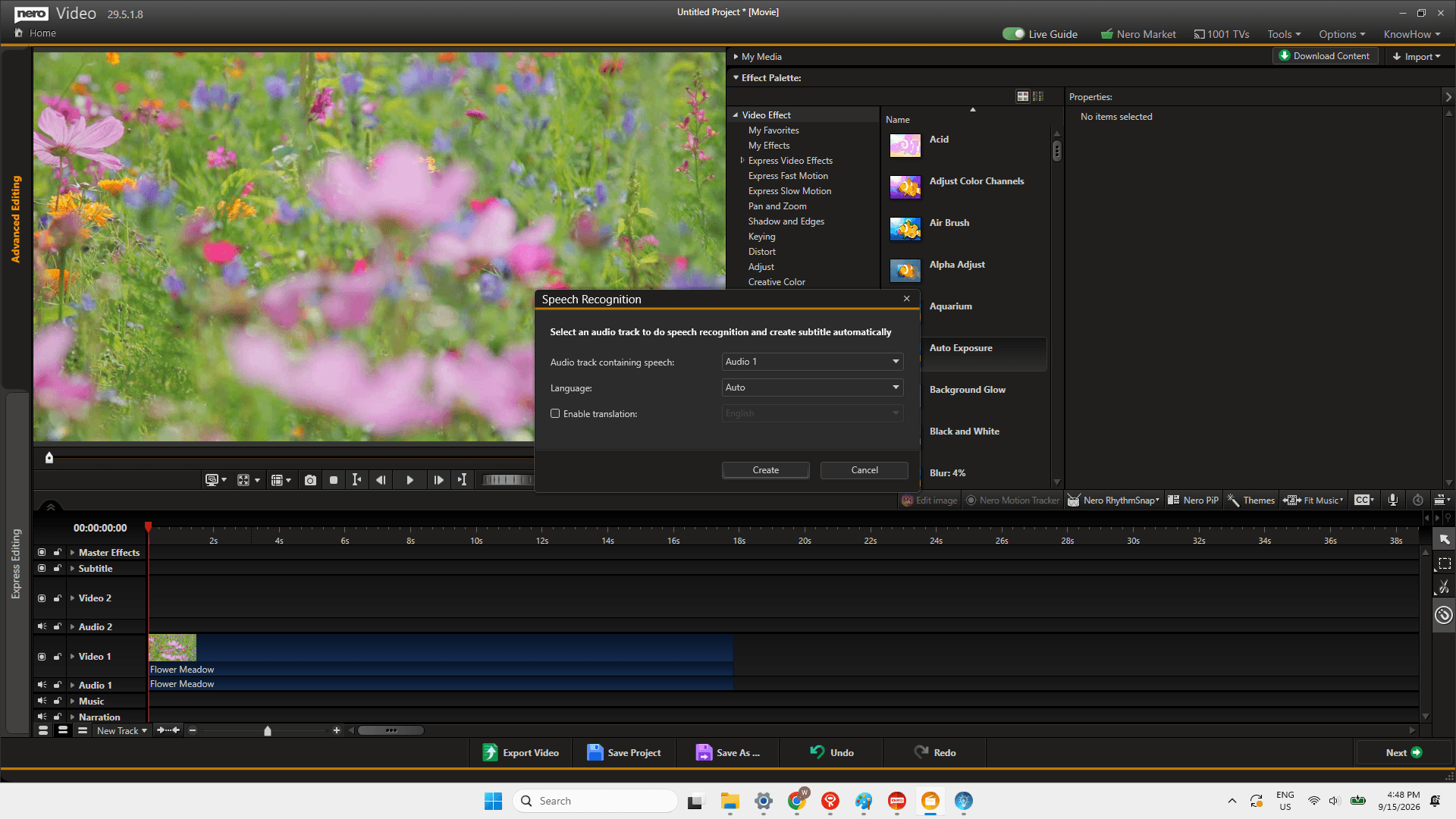
Subtitles are part of many video projects, whether you are preparing a tutorial, a presentation, a family video, or a clip to share more widely. Nero Video 2027 expands the subtitle workflow so you can bring in an existing file, create a starting subtitle track from spoken audio, make manual corrections, and export subtitles as an SRT file.
Import and export external SRT subtitle files
Nero Video now supports external SRT subtitle files for both import and export. If subtitles already exist for a project, you can bring the SRT file into Nero Video rather than recreating the text from scratch. When the edit is complete, you can also export the subtitles as an SRT file for use outside the project.


Generate subtitles with speech recognition
For videos with spoken dialogue, Nero Video can generate subtitles through speech recognition. This gives you a subtitle draft based on the audio in your project, creating a starting point for the captioning process.
Edit subtitles manually
Generated or imported subtitles can be edited manually. You can review the wording and make the adjustments needed for the final version of the video.

Together, these additions make subtitles easier to manage from beginning to end: import an existing SRT file when you have one, generate a starting draft from speech when you do not, refine the text manually, and export subtitles when the project is ready.
Nero Recode
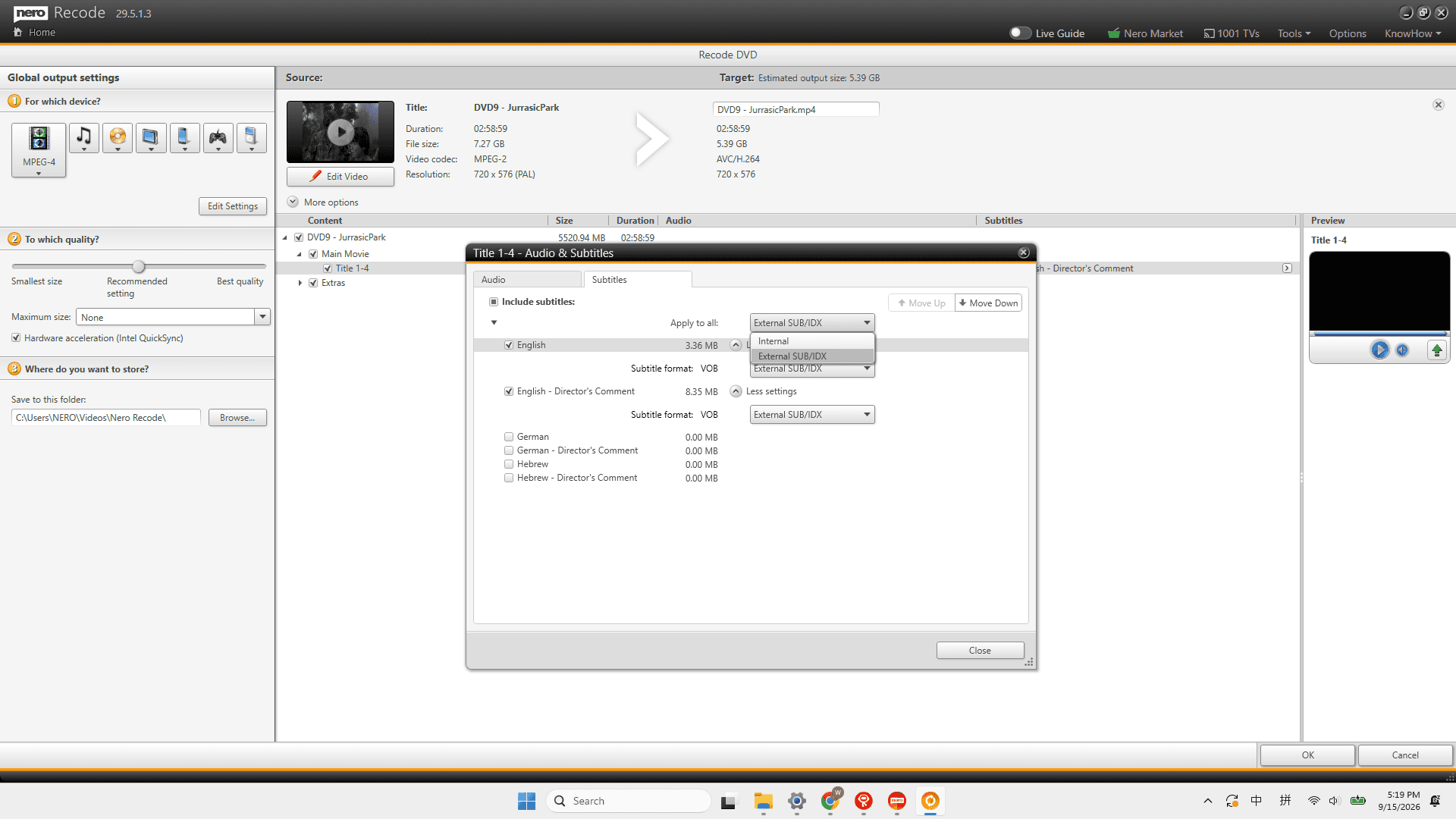
Nero Recode 2027 adds a new option for users working with DVD subtitle tracks. DVD subtitles can now be exported separately as SUB/IDX files.
This means the subtitle track does not have to be burned directly into the video. Instead, it can be exported as a separate subtitle file alongside the video material.
To use this option in Nero Recode:
Open the subtitle selection menu for the title, choose Subtitle settings.

Select External SUB/IDX for the subtitle track you want to export.
Nero MediaHome
People organize media in different ways. Smart categories are useful when you want to explore a library by the people or locations in it; familiar folders are useful when you already know where a file was saved.
Nero MediaHome 2027 now lets you browse photos and videos directly through their original Windows folder structure. You can navigate the folders you already use on your computer while continuing to use Nero MediaHome’s intelligent classifications, including Faces and Places.

This gives your library two complementary paths. Use Faces and Places when you want to browse by what is in your collection, or follow your own folder structure when you already know where your files are stored.
Nero Burning ROM
Ripping one CD is straightforward. Ripping an entire collection involves repeated decisions: applying the same settings, changing discs, organizing output files, and reviewing metadata. Nero Burning ROM 2027 improves that broader workflow with updates designed for repeated CD ripping tasks.
To make the workflow easier to find, Nero Burning ROM includes a dedicated CD Ripper entry, available from the Rip Audio CD button in the main toolbar.

Reuse settings across multiple CDs
When working through a collection, you can reuse the same settings while ripping multiple CDs in succession. This reduces the need to set up the same options again for every disc.

Automatically eject discs and receive a completion sound
Nero Burning ROM can automatically eject a disc when ripping is complete. It can also play a completion sound, giving you a clear signal that it is time to move to the next CD.
For a longer collection-ripping session, these options help make the handoff from one disc to the next easier to manage.

More options for ripping, organization, and metadata
The 2027 release also broadens the overall ripping experience. Nero Burning ROM adds broader support for CD image files and further options for output and file organization. Metadata editing is faster, while Gracenote handling has been improved. The update also includes stability improvements.


Nero Screen Recorder
Note: Nero Platinum Suite 2027 includes the Basic version of Nero Screen Recorder only. Pro features require a separate upgrade.
A recording is often only the first stage of the work. Before sharing a software demonstration, walkthrough, training video, or presentation capture, small visual and audio adjustments can help make the result easier to follow.
Nero Screen Recorder 2027 adds two post-recording controls: one for the appearance of the mouse cursor and one for balancing audio channels.
Adjust mouse cursor style and size
After recording, you can adjust the style and size of the mouse cursor. This gives you more control over how cursor movements appear in the finished video, particularly when the cursor is guiding viewers through actions on screen.


Balance audio channels
Nero Screen Recorder also lets you adjust the volume balance of individual audio channels after recording. This allows you to refine the balance between the sounds captured in a recording.


These controls focus on the details viewers notice while following a screen-based explanation: where to look and what to hear.
Nero AI Image Upscaler
Note: Nero Platinum Suite 2027 includes the Basic version of Nero AI Image Upscaler only. Pro+ features are not included.
Preparing a group of images often involves two separate jobs: setting the framing you want and keeping the files manageable as you move them through the workflow. Nero AI Image Upscaler 2027 adds tools for both.
New image crop tool
A new crop tool lets you adjust the image size or crop area as part of the image workflow.

Larger import and export batches
Nero AI Image Upscaler now supports importing up to 100 images in a single batch. You can export up to 25 images at once (or 100 with Pro+).
This makes it easier to work with larger groups of source images in one session.
Explore Nero Platinum 2027
Nero Platinum Suite 2027 is available for pre-order. Pre-order customers receive their version on October 27, one week before the official release on November 3.