Upscale Anime Images to 16K&32K
Upscale Anime Images to 16K&32K
Upscale Anime Images to 16K&32K
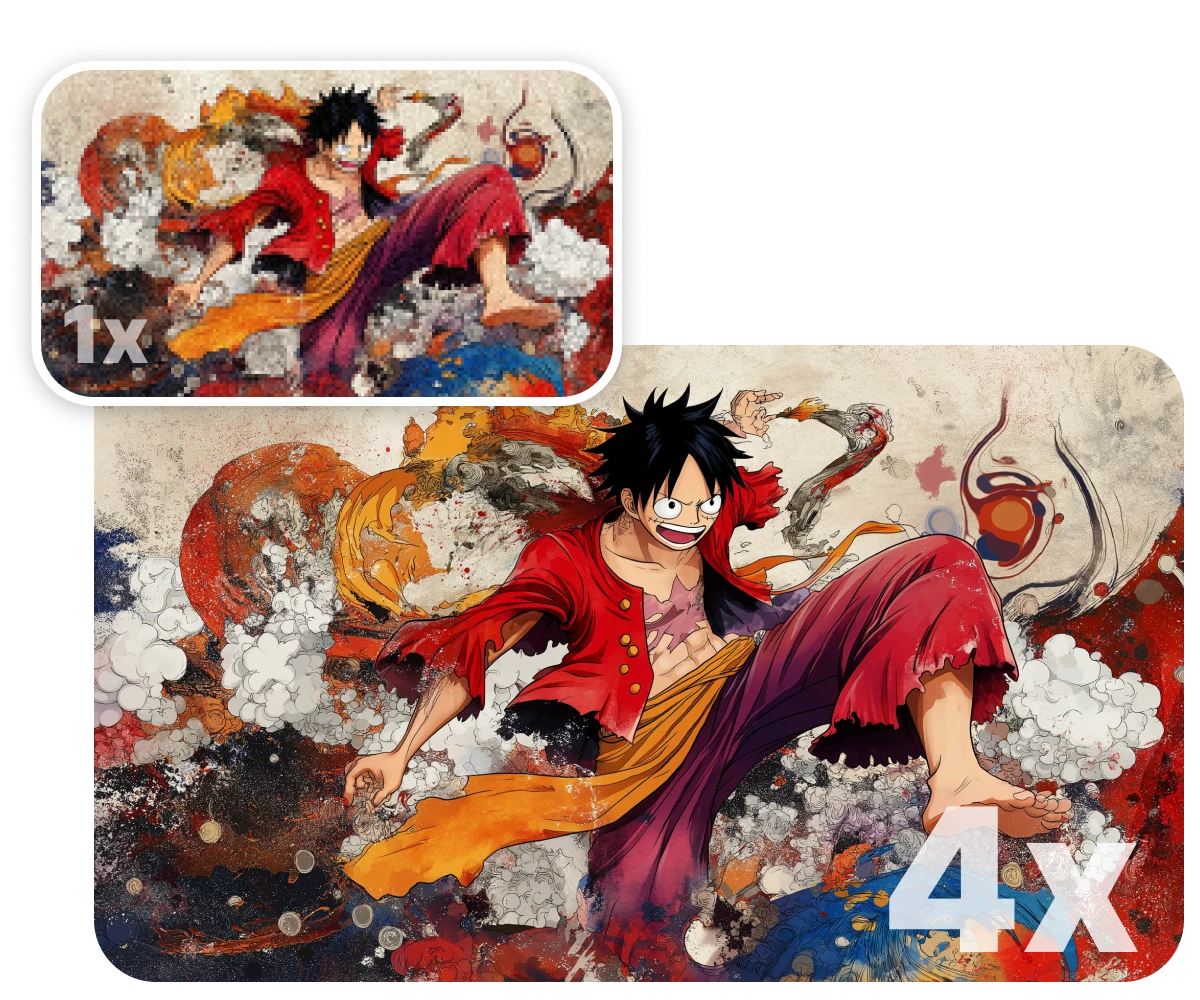
Bring your favorite anime, manga, or waifu images to life in ultra-high resolution. With Nero AI's advanced anime upscaling model, you can sharpen blurry screenshots, clean up pixelated avatars, and turn low-quality images into gallery-worthy HD in seconds.
Bring your favorite anime, manga, or waifu images to life in ultra-high resolution. With Nero AI's advanced anime upscaling model, you can sharpen blurry screenshots, clean up pixelated avatars, and turn low-quality images into gallery-worthy HD in seconds.
Bring your favorite anime, manga, or waifu images to life in ultra-high resolution. With Nero AI's advanced anime upscaling model, you can sharpen blurry screenshots, clean up pixelated avatars, and turn low-quality images into gallery-worthy HD in seconds.

Anime Upscaling
Anime Upscaling
Anime Upscaling
Upscale anime, manga, waifu images, avatars, and illustrations with an AI model designed for 2D artwork.
Upscale anime, manga, waifu images, avatars, and illustrations with an AI model designed for 2D artwork.
Upscale to 8K,16K,32K
Upscale to 8K,16K,32K
Upscale to 8K,16K,32K
Choose preset sizes or set a custom resolution to create sharper wallpapers, profile pictures, prints, and creative assets.
Choose preset sizes or set a custom resolution to create sharper wallpapers, profile pictures, prints, and creative assets.
Clean Lines, Less Noise
Clean Lines, Less Noise
Clean Lines, Less Noise
Reduce pixelation, compression artifacts, banding, and rough shading while preserving the original anime style.
Reduce pixelation, compression artifacts, banding, and rough shading while preserving the original anime style.
Tailored AI Model for Anime & Illustrations
Tailored AI Model for Anime & Illustrations
Tailored AI Model for Anime & Illustrations
Nero AI's anime upscaling model is specifically trained on anime-style art, including waifu, manga, and CG illustrations. It understands the clean lines, color gradients, and unique aesthetic of 2D visuals.
Compared to general upscalers, this model delivers sharper edges, enhanced details, and smoother textures—without introducing artifacts or smudging. Perfect for anime screenshots, fan art, or AI-generated images.
Nero AI's anime upscaling model is specifically trained on anime-style art, including waifu, manga, and CG illustrations. It understands the clean lines, color gradients, and unique aesthetic of 2D visuals.
Compared to general upscalers, this model delivers sharper edges, enhanced details, and smoother textures—without introducing artifacts or smudging. Perfect for anime screenshots, fan art, or AI-generated images.
Nero AI's anime upscaling model is specifically trained on anime-style art, including waifu, manga, and CG illustrations. It understands the clean lines, color gradients, and unique aesthetic of 2D visuals.
Compared to general upscalers, this model delivers sharper edges, enhanced details, and smoother textures—without introducing artifacts or smudging. Perfect for anime screenshots, fan art, or AI-generated images.
Install & Upscale Now
Upscale Anime Art Up to 32K with 8× AI Upscaling
Upscale Anime Art Up to 32K with 8× AI Upscaling
Upscale Anime Art Up to 32K with 8× AI Upscaling
Whether you're working with low-res anime screenshots, vintage scans, manga panels, or AI-generated artwork, Nero AI can now upscale images by 2×, 4×, or 8× — upscale to 8K, 16k, 32K resolution.
The upgraded engine helps preserve clean line art, vivid colors, textures, edges, and natural details, making it ideal for ultra-clear wallpapers, posters, banners, printable artwork, PFPs, and professional creative assets.
Whether you're working with low-res anime screenshots, vintage scans, manga panels, or AI-generated artwork, Nero AI can now upscale images by 2×, 4×, or 8× — upscale to 8K, 16k, 32K resolution.
The upgraded engine helps preserve clean line art, vivid colors, textures, edges, and natural details, making it ideal for ultra-clear wallpapers, posters, banners, printable artwork, PFPs, and professional creative assets.
Install & Upscale Now
Intelligent Denoising, Maximum Clarity
Intelligent Denoising, Maximum Clarity
Intelligent Denoising, Maximum Clarity
Nero AI removes compression noise, banding, and rough shading with intelligent denoising tailored for anime art. Even images damaged by poor encoding or screenshots from streaming services get a clean refresh.
The result? Smooth gradients, vivid colors, and ultra-clean backgrounds that preserve the original anime style. Ideal for both casual users and professionals who demand studio-quality results.
Nero AI removes compression noise, banding, and rough shading with intelligent denoising tailored for anime art. Even images damaged by poor encoding or screenshots from streaming services get a clean refresh.
The result? Smooth gradients, vivid colors, and ultra-clean backgrounds that preserve the original anime style. Ideal for both casual users and professionals who demand studio-quality results.
Nero AI removes compression noise, banding, and rough shading with intelligent denoising tailored for anime art. Even images damaged by poor encoding or screenshots from streaming services get a clean refresh.
The result? Smooth gradients, vivid colors, and ultra-clean backgrounds that preserve the original anime style. Ideal for both casual users and professionals who demand studio-quality results.
Install & Upscale Now
Edit Anime Art Right on Your Phone
Edit Anime Art Right on Your Phone
Edit Anime Art Right on Your Phone
Nero Lens brings the same AI toolkit to iOS and Android: upscale, sharpen and restore anime images in a few taps, describe an edit and let the AI agent handle it, or turn a still frame into motion with AI video.
Instant Me also transforms your own photos into anime, cartoon and digital art styles — no desktop needed.
Nero Lens brings the same AI toolkit to iOS and Android: upscale, sharpen and restore anime images in a few taps, describe an edit and let the AI agent handle it, or turn a still frame into motion with AI video.
Instant Me also transforms your own photos into anime, cartoon and digital art styles — no desktop needed.
Try Nero Lens

How to Upscale Anime With Nero AI Image Upscaler?
How to Upscale Anime With Nero AI Image Upscaler?
How to Upscale Anime With Nero AI Image Upscaler?

Free Download
Free Download
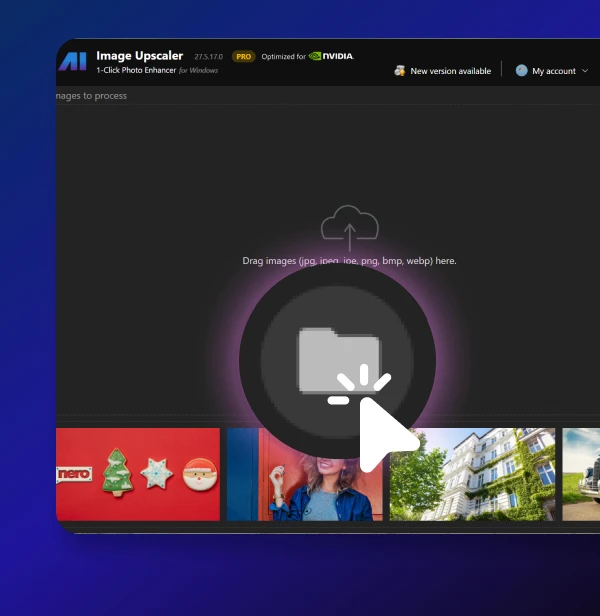
Import Your Anime Image
Drag and drop or click to upload any anime, manga, or illustration image—JPG or PNG supported.
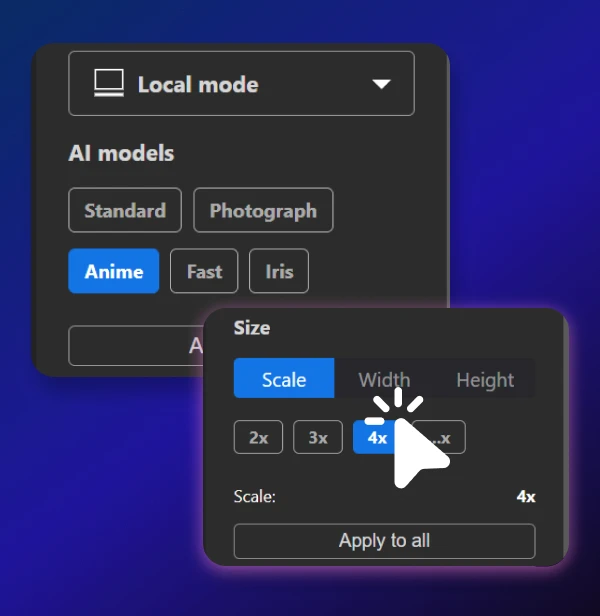
Choose Anime Mode & Upscale
Select the Anime model, then choose your preferred upscale level (2x, 4x, 8x). Let Nero AI do the magic.
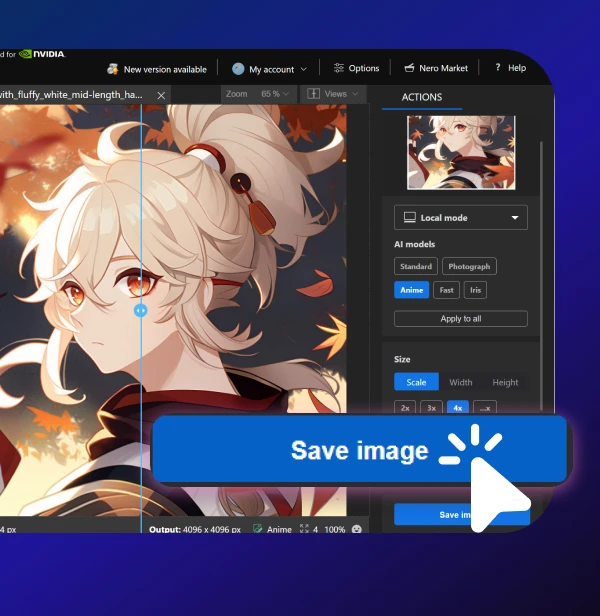
Save Your Enhanced Image
Preview the results and save your high-res anime picture in one click. Share it anywhere you like.
Import Your Anime Image
Drag and drop or click to upload any anime, manga, or illustration image—JPG or PNG supported.
Choose Anime Mode & Upscale
Select the Anime model, then choose your preferred upscale level (2x, 4x, 8x). Let Nero AI do the magic.
Save Your Enhanced Image
Preview the results and save your high-res anime picture in one click. Share it anywhere you like.
Import Your Anime Image
Drag and drop or click to upload any anime, manga, or illustration image—JPG or PNG supported.
Choose Anime Mode & Upscale
Select the Anime model, then choose your preferred upscale level (2x, 4x, 8x). Let Nero AI do the magic.
Save Your Enhanced Image
Preview the results and download your high-res anime picture in one click. Share it anywhere you like.

"Nero AI Image Upscaler did a great job — the details came out sharper and cleaner without losing the original feel."
"Nero AI Image Upscaler did a great job — the details came out sharper and cleaner without losing the original feel."
"Nero AI Image Upscaler did a great job — the details came out sharper and cleaner without losing the original feel."
- Safan (Anime Lover)
- Safan (Anime Lover)
Full Review 👉
Full Review 👉
Loved by 75k+ customers
Loved by 75k+ customers
Loved by 75k+ customers


I’ve been restoring anime screenshots for years. Nero AI gave me clearer results than I ever got from traditional waifu2x tools—and in half the time.

Didn’t think it could fix my tiny profile image, but the upscaled version looks like it was drawn that way. Really impressed!

I used to manually clean anime scans in Photoshop. Now I just run them through Nero AI and it’s done in 5 seconds.
We’ve got you covered
We’ve got you covered
We’ve got you covered
How do I use the Nero AI Image Upscaler?
To use the Nero AI Image Upscaler, you can download the app our official Nero Downloader. Import your image, select an AI model, and start processing. For more details, check our User Guide.
How does Nero AI Image Upscaler compare to Topaz Labs Gigapixel?
How does Nero AI Image Upscaler work?
Is there a free trial?
What types of images can your upscaler handle?
