Harry Styles is playing thirty nights at Madison Square Garden this year. BTS is back on tour. Olivia Rodrigo, Bad Bunny, Lady Gaga, Bruno Mars, a reunited My Chemical Romance. 2026 is stacked for live music.
If you got tickets, you probably came home with a phone full of clips. And if you're like most people, that excitement lasted right up until you cast the footage to your 4K TV and realized it looks like it was filmed through a vaseline-smeared window.
The Universal Concert Video Problem
Reddit's concert communities repeat the same frustration hundreds of times. A user who saw Tyler, the Creator from the front row posted in r/Concerts: "I have the iPhone 15 Pro Max and whenever I zoomed in the quality was awful and super blurry. Tyler was my favorite artist of all time so this footage stung a lot to watch back." Another reply: "The stage lighting was dark/bright at random times so sometimes I would get clear footage than the next it would be awful."
A Taylor Swift Eras Tour attendee: "I kept struggling with getting pictures and video of Taylor that wasn't hazy/blurry. It's like the phone doesn't want to focus at all." Top reply? "Same problem here. Perfect pictures in daylight, but at nighttime, blurry as hell."
Even non-filmers acknowledge it. One r/popheads user: "No one on your IG story cares about your blurry pixellated dark 15 second clip from nosebleed with overbassed distorted audio."
And for old recordings, someone on r/VideoEditing trying to restore a 90s TV broadcast: "When I say 'blocking,' I mean the jagged edges of the darker parts of the video. I think that's caused by low bitrate... it has some pretty awful things going on in it."
Same three problems, whether you want to enhance old concert videos from 2008 or fix clips from last night.
What Causes Low-Quality Concert Video? Three Things
Low-light noise. Concert venues are dark. Spotlights against black backgrounds force camera sensors to crank ISO, producing grainy chroma noise over everything. As one r/S22Ultra user put it: "For concerts with a lot of flashy lights, turn off the auto fps. The lights will mess up the phone's algorithm and the videos will look pixelated and blurry."
Digital zoom blur. Phone digital zoom doesn't add pixels, it stretches them. A singer's face at 40 by 40 pixels gets blown up, and every pixel of blur gets magnified. As one r/VideoEditing commenter warned: "All upscaling footage does is it takes your 1080p footage and basically blows up every pixel to fill a 4K workspace."
Compression artifacts. VHS rips, YouTube re-encodes, Bluetooth transfers. Each generation adds blocky artifacts, banding in gradients, and detail-smearing that accumulates like dust.
Traditional Upscaling vs. AI Upscaling: What's the Difference?
Stretch a 480p video to 4K in a standard editor and you get a bigger blurry video. No detail is added. One r/TopazLabs user explained the old incremental approach: “You cannot really go from something like 320x240 directly to 4K. You will have to do it gradually. Upscale from 240 to 480, import the 480 and upscale to 720, import the 720 and upscale to 1080 and so on.”
AI upscaling works differently. A trained neural network predicts what missing detail should look like based on patterns learned from millions of high-resolution frames. It rebuilds skin texture, fabric weave, and stage lighting gradients that were never in the source.
Traditional Upscaling | AI Upscaling (Nero) | |
|---|---|---|
How it works | Stretches existing pixels | Neural network reconstructs detail |
Noise | Amplifies it | Removes grain, preserves detail |
Low-light footage | Gets worse | Improves with dark-detail enhancement |
Compression artifacts | Preserved or worsened | Detected and smoothed |
Frame rate boost | Not supported | AI interpolation up to 120 FPS |
Result on concert footage | Bigger but softer | Sharper, cleaner |
If you are still comparing tools before processing your footage, check our full guide to the best AI video enhancer for Windows in 2026. It compares Nero AI Video Upscaler with other desktop and online enhancers across upscaling quality, AI models, processing speed, ease of use, and pricing, so you can choose the right tool before restoring your concert videos.
Before and After: Freddie Mercury, 480p to 2K 60FPS
This test uses Queen's legendary live performance:
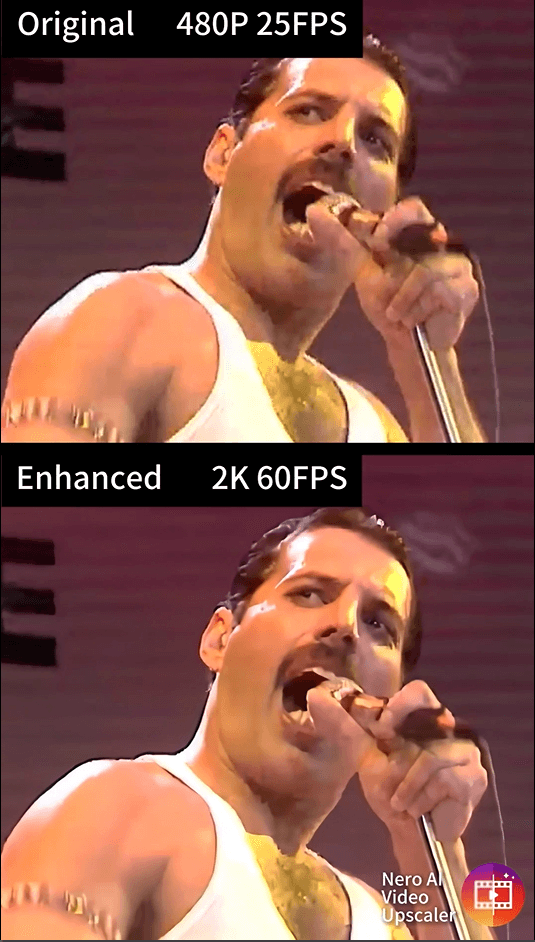
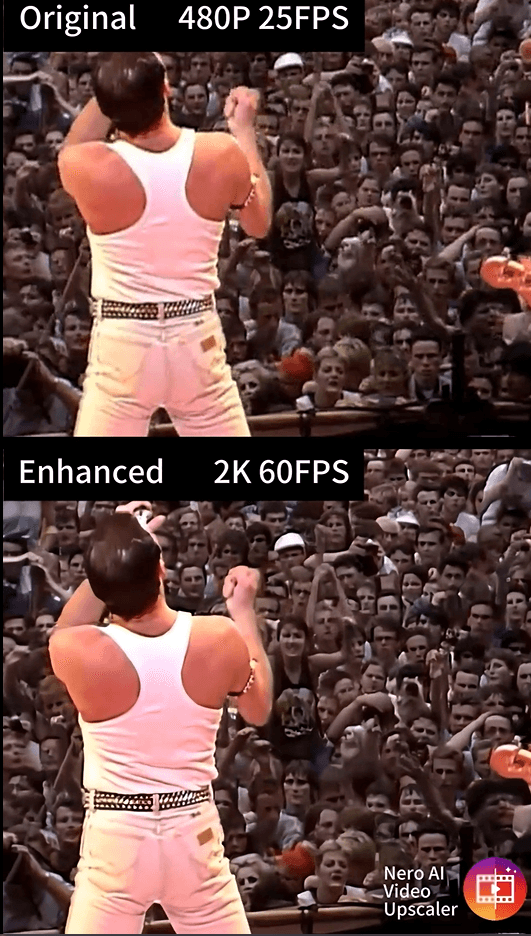
The source is a 480p, 25FPS clip. On a modern 4K display: soft, noisy, Freddie's face dissolving into pixels whenever the lighting shifts.
After processing with Nero AI Video Upscaler, the same frame outputs at 2K and 60 FPS:
Skin texture comes back. Sweat sheen, individual hair strands that didn't exist in the 480p source.
The tank top has fabric. What was a flat white blob now shows ribbed material.
Stage lighting separates into layers instead of one blown-out glow.
Motion gets fluid. 25 to 60 FPS makes the performance feel live again.
Not a filter. The AI reconstructed missing information frame by frame.
How to Upscale Concert Video to 4K: Step by Step
1. Import Your Footage
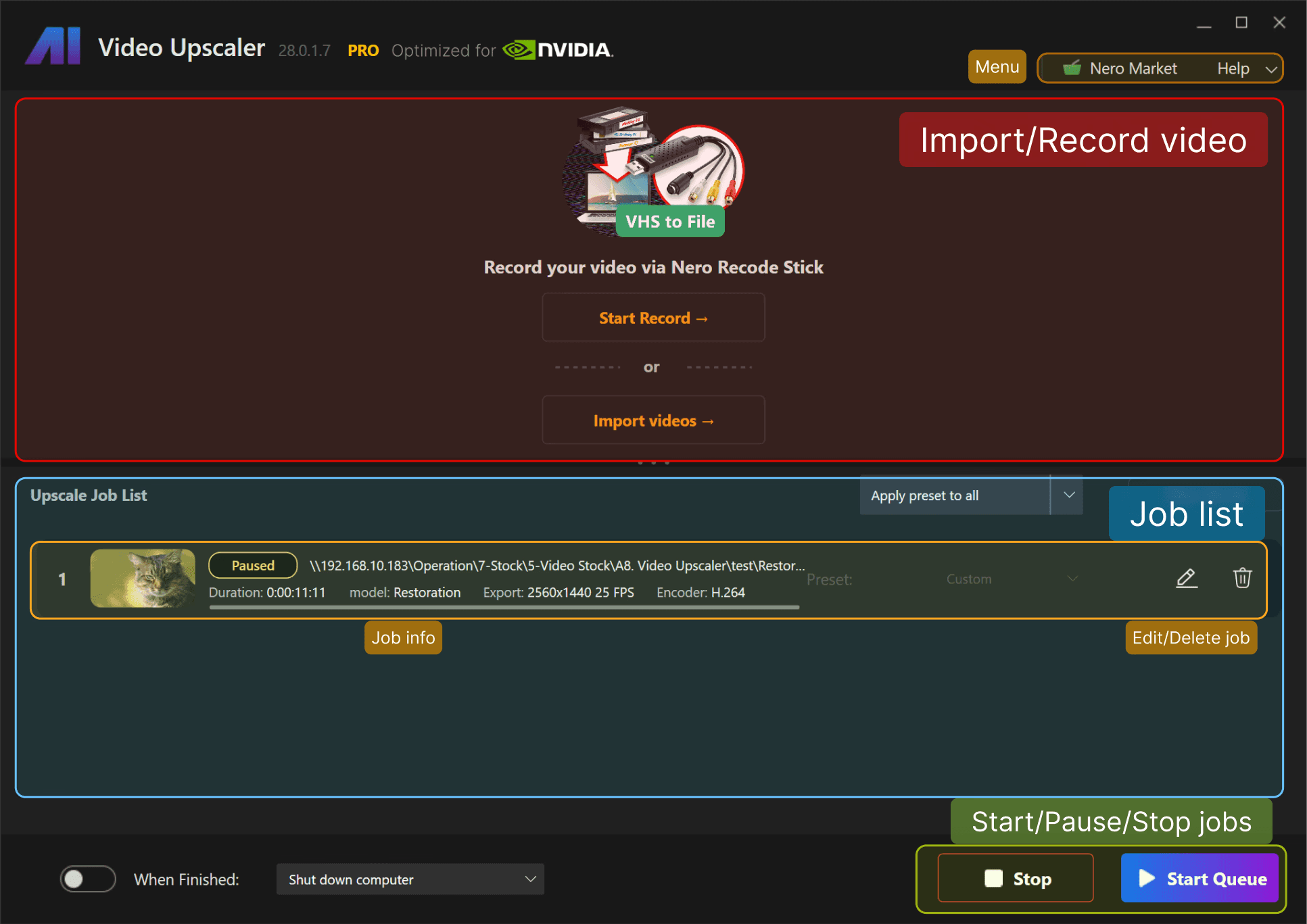
Drag and drop into the Nero window. Batch import lets you load an entire folder from the same show. Accepts MP4, MOV, AVI, MKV, 3GP, MPEG-2, H.264, H.263, HEVC, AV1, and VP9 (HEVC/AV1/VP9 need the Microsoft Video Extensions pack). Exports as MP4 in H.264 or H.265.
2. Choose Your AI Model
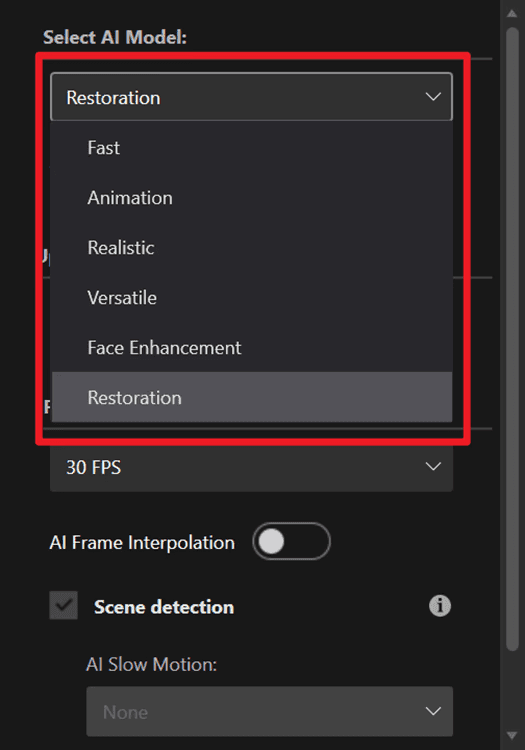
Nero's 2026 version offers six AI models:
Model | Best For | Concert Use Case |
|---|---|---|
Realistic | Natural video footage | Top pick. Preserves skin texture and stage lighting. Used in the Freddie Mercury test. |
Versatile | Softer enhancement, fewer artifacts | Fallback if Realistic looks over-sharpened. Preserves film grain. |
Face Enhancement | Recovering facial details | Combine with Realistic when the singer's face is small in frame. |
Restoration | Restoring micro details via generative reconstruction | Good for archival recordings from the 80s and 90s. |
Fast | Quick general-purpose upscaling | Previewing before a full render. Keeps more noise. |
Animation | 2D cartoons | Not for concert footage. |
Start with Realistic. If it looks over-sharpened, switch to Versatile.
3. Set Resolution and Frame Rate
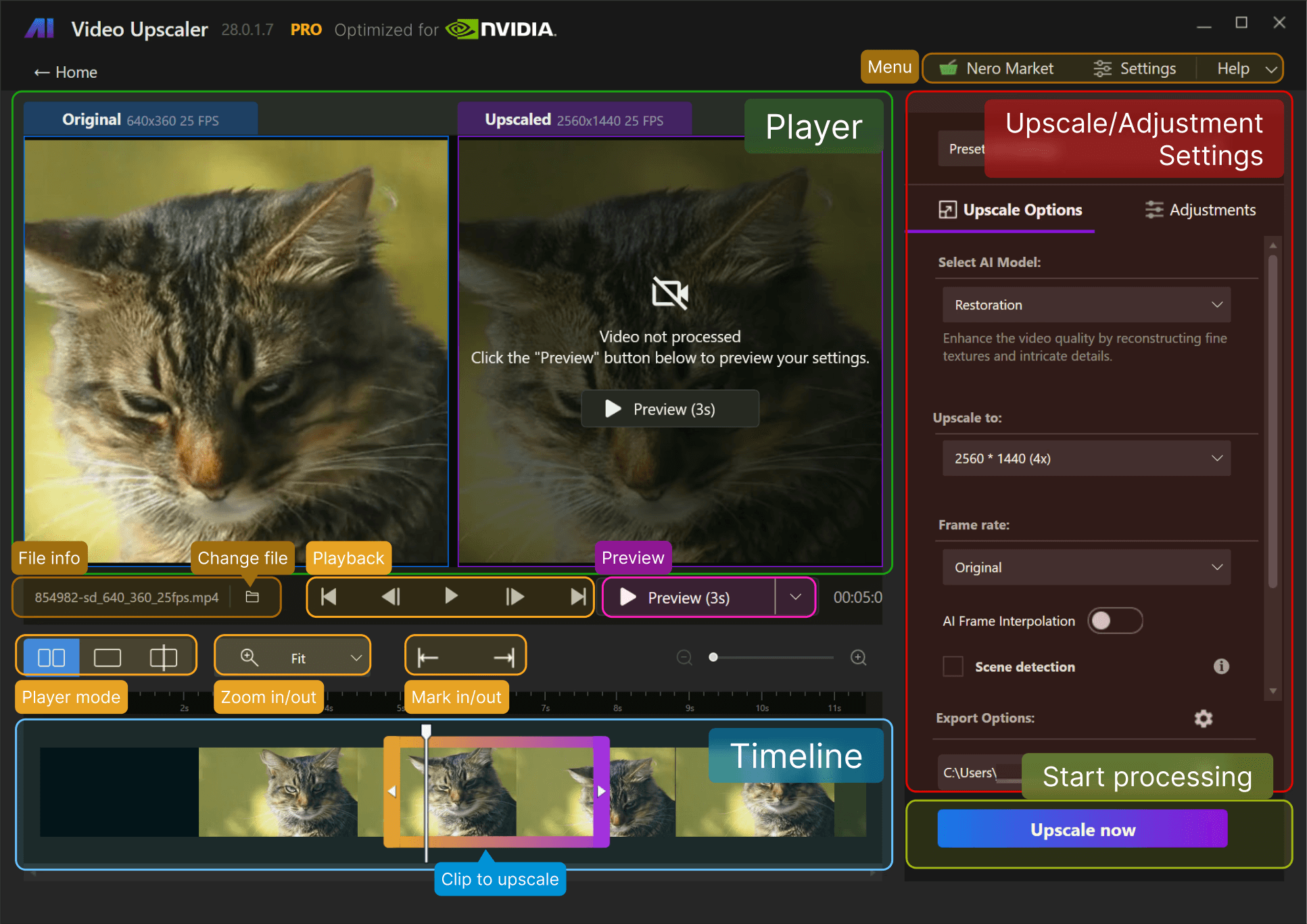
11 resolution presets, from 720x576 up to 7680x4320 (8K). For 480p or 720p source, 2x (to roughly 1080p or 2K) often beats pushing straight to 4K. To upscale 1080p to 4K, 4x works well.
Frame interpolation: 23.97 to 120 FPS. Concert footage at 24 to 30 FPS benefits from 60 FPS interpolation. Nero includes scene detection to prevent morphing artifacts across lighting cuts and strobe flashes, which concert videos are full of.
4. Preview
Three views: side-by-side, split (draggable split line), and single. Zoom to inspect detail. Pick a clip length from 1 second to full video. You can also trim by setting in and out points, so you only upscale the good 30 seconds of a 5-minute clip.
5. Process and Export
Processing time depends on your GPU, video length, and target resolution. Nero's official requirements:
Minimum | Recommended | |
|---|---|---|
OS | Windows 10/11 64-bit | Same |
CPU | AMD Ryzen or Intel Core, post-2017 | Same |
RAM | 8 GB | 32 GB |
GPU | AMD Radeon 500 / NVIDIA GTX 900 series, 4 GB VRAM (Full HD to 4K) | AMD RX 6700 XT / NVIDIA RTX 3060, 12 GB VRAM (4K to 8K) |
Disk | 20 GB | 20 GB |
GPU and NPU acceleration supported. If you hit out-of-memory, Nero's FAQ suggests closing other apps and restarting first. You can pause mid-batch to edit (edited jobs restart from zero). Save settings as presets to apply across a whole folder of clips from the same night.
Real-World Examples: Different Cameras, Different Eras
Source | Resolution & FPS | Recommended Model | Upscale Target | Key Challenge |
|---|---|---|---|---|
2008 Feature Phone (Nokia N95) | 640x480, 15 FPS | Realistic + Face Enhancement | 2x to ~960p | Extreme low res, low frame rate |
2012 Point-and-Shoot | 720p, 30 FPS | Versatile | 2x to 1440p | Auto-exposure pulsing |
2016 iPhone (6s/7, no night mode) | 1080p, 30-60 FPS | Realistic | 4x to 4K | Shadow noise, motion blur, zoom smearing |
2008 Nokia N95. Linkin Park from the upper deck, 5MP sensor, no optical zoom. 640x480 at 15 FPS. Realistic at 2x reconstructs stage structure. Frame interpolation to 30 FPS smooths motion. Face Enhancement brings back just enough of Chester’s expressions. Goes from unwatchable to enjoyable.
2012 Point-and-Shoot. Canon PowerShot, 720p at 30 FPS. Auto-exposure confused by concert lighting, pulsing between over and underexposed. Versatile improves resolution without exaggerating the pulsing. 2x to 1440p holds up on a large TV.
2016 iPhone. 1080p at 30-60 FPS, dark venue, no night mode, digital zoom. Looks sharp on a phone, falls apart on a 4K TV. This is the sweet spot for 4x to 4K. Realistic reconstructs facial and fabric detail the sensor captured but low res obscured. Most dramatic improvement.
Concert clips are not the only old videos worth saving. If you also have VHS tapes, camcorder recordings, or family videos from the 80s and 90s, follow our complete workflow on how to restore old videos from VHS to 4K or 8K with AI. It explains how to capture analog footage, enhance it with Nero AI Video Upscaler’s Restoration model, and archive the restored files for long-term storage.
How to Preserve Concert Audio When Upscaling Video
The audio is the concert. A sharp video with distorted sound is still unwatchable.
Nero processes the video stream only. Your original audio passes through untouched, which is ideal: crowd noise, reverb, the occasional clipping when the bass hits. That's the live feel. You don't want to over-clean it.
All processing is local. Nero does not upload your videos to any cloud server. Nothing is transmitted, stored, or shared. Your concert footage never leaves your computer.
If audio is genuinely unlistenable, run it through a dedicated cleanup tool separately, then mux it back. Nero also has AI slow motion with audio sync, useful for slowing down a guitar solo or pyrotechnic burst.
As one Reddit user put it: "I re-watch my concert vids all the time. I really try to strike a good balance between living in the moment but also getting some excellent video footage, especially of my favorite songs so I can watch them over and over again for years to come."
These aren't just files. They're the closest thing to a time machine most of us will ever have.
Frequently Asked Questions
Can you upscale a low-quality concert video to 4K?
Yes. Nero AI Video Upscaler can take concert footage from 480p to 4K. AI models reconstruct missing detail rather than stretching pixels. 1080p upscales to 4K cleanly. 480p is better at 2x (to roughly 1080p or 2K) to avoid asking the AI to invent too much.
What is the best AI model for upscaling concert footage?
Realistic. It sharpens edges, suppresses low-light noise, and preserves skin textures and stage lighting. If over-sharpened, switch to Versatile. For small faces in frame, combine Realistic with Face Enhancement.
How long does it take to upscale a concert video?
Depends on your GPU, video length, and target resolution. Nero requires minimum 4 GB VRAM (AMD Radeon 500 / NVIDIA GTX 900) for Full HD to 4K, recommends 12 GB VRAM (AMD RX 6700 XT / NVIDIA RTX 3060) for 4K to 8K. RAM: 8 GB min, 32 GB recommended. Batch processing lets you queue clips unattended.
Does AI upscaling fix blurry concert footage?
Depends on the cause. It can reconstruct detail lost to low resolution and compression, but cannot fix out-of-focus footage. If the camera failed to focus, no upscaling creates detail that was never captured. If blur is from low res, digital zoom, or compression, AI upscaling helps dramatically.
Will upscaling improve the audio quality of my concert videos?
No. Nero processes video only. Audio passes through untouched. If your audio is distorted, use a dedicated audio cleanup tool separately.
Is Nero AI Video Upscaler free?
Videos under 30 seconds are free using the core AI models. A 7-day trial unlocks everything: 4K/8K output, all six models, frame interpolation up to 120 FPS, batch processing. Download at pcai.nero.com/video-upscaler.
What video formats does Nero support?
Import: 3GP, AVI, MP4, MOV, MKV, MPEG-2, H.264, H.263, HEVC, AV1, VP9 (HEVC/AV1/VP9 need Microsoft Video Extensions pack). Export: MP4 in H.264 or H.265. Resolutions from 720x576 to 7680x4320 (8K). Frame rates 23.97 to 120 FPS.
Does Nero upload my videos to the cloud?
No. All processing is local on your CPU or GPU. No data is transmitted, stored, or shared with Nero's servers. Only account login and activation use your internet connection.
Stop Settling for Pixelated Memories
The 2026 concert season will generate billions of hours of phone footage. The phones will get better, the venues will add better lighting. But the footage you already have isn't going to improve on its own.
AI upscaling is the first technology that can actually fix the problem: not just making old videos bigger, but reconstructing detail that was lost when they were recorded. Whether it's Freddie Mercury at 480p or your iPhone clips from last summer, the tools exist to bring them back.