Image Upscaler
What's New
Discover the latest updates and improvements in Nero AI Image Upscaler.
[Jun. 2026] Image Upscaler 2027 Released!
Release Platform:
Official Website (Windows Installer) — v28.5.40 (Coming soon in June)
Microsoft Store — v3.1.2 (Jun 4, 2026)
Steam — v2.1.1 (Jun 1, 2026 )
macOS — v2.0.13 (Coming soon in June)
Note: Version numbers and release timing may vary across platforms due to individual store review processes.
Bigger. Sharper. Faster.
Meet the Next Generation of AI Image Upscaler
This release delivers one of the biggest upgrades to our AI Image Upscaler yet — bringing larger upscale capabilities, smarter clarity recovery, and dramatically improved batch productivity.
Whether you’re restoring old memories, improving blurry photos, or processing large creative projects, the new generation engine is built to help you do more in less time.
🚀 New 8× Upscaling
The new 8× upscale mode allows dramatically larger image enhancement while preserving texture, edges, and natural detail.
An 4K image can now be enlarged up to 32K resolution*, making it ideal for:
Large-format printing
Posters and banners
Professional design assets
Ultra high-resolution workflows
Compared to previous versions, the new engine delivers cleaner edges, better texture reconstruction, and improved detail stability.
🖼️ Ultra Large Output Support — Up to 1024 MP
This generation also introduces support for outputs up to 1024 megapixels.
The upgraded processing pipeline is optimized for extremely large images while maintaining:
Stable detail reconstruction
Better memory handling
Smoother large-scale processing
Improved export reliability
Perfect for creators working with:
Large canvas artwork
Commercial print assets
High-resolution AI creations
Professional production workflows
✨ New AI Models: Sharpen & Unblur
Different image problems require different AI solutions.
This release introduces two specialized enhancement models focused entirely on clarity recovery.
Sharpen
Designed for soft images that already contain details but lack crispness.
Sharpen improves:
Texture visibility
Edge definition
Fine-detail contrast
Overall image clarity
Great for:
Landscapes
Product photos
AI-generated artwork
Screenshots and graphics
Unblur
Built specifically for blurry images caused by:
Motion blur
Camera shake
Focus issues
Compression artifacts
Unblur intelligently reconstructs lost structure while keeping results natural and readable.
Ideal for:
Old phone photos
Blurry portraits
Moving subjects
Low-quality scanned images
⚡ Much Larger Batch Processing
This release also delivers a major productivity upgrade for power users.
Previous versions supported processing up to 20 images per batch.
Now, the new engine supports up to 100 images in a single run — a massive 5× increase in batch capacity.
That means:
Fewer interruptions
Less repetitive setup
Faster project completion
Better workflows for large image collections
Whether you're restoring entire albums or enhancing content libraries, batch processing is now dramatically more efficient than before.
Combined with backend optimizations and improved processing pipelines, large-scale tasks now feel smoother, faster, and more stable.
🔧 Designed for Heavy Creative Workloads
This update is focused on helping creators push further with AI image enhancement.
We improved:
Maximum upscale capability
Detail reconstruction quality
Blur recovery accuracy
Large-scale processing workflows
Overall engine stability and efficiency
From casual photo restoration to professional creative production, this release gives you more power across every stage of the workflow.
Available Now
Update today to experience:
Massive 8× image enlargement
Dedicated Sharpen & Unblur AI models
5× larger batch processing capacity
Faster and smoother large-project workflows
More images. More detail. Less waiting.
[Mar. 2026] Batch Actions, View Options & Stability
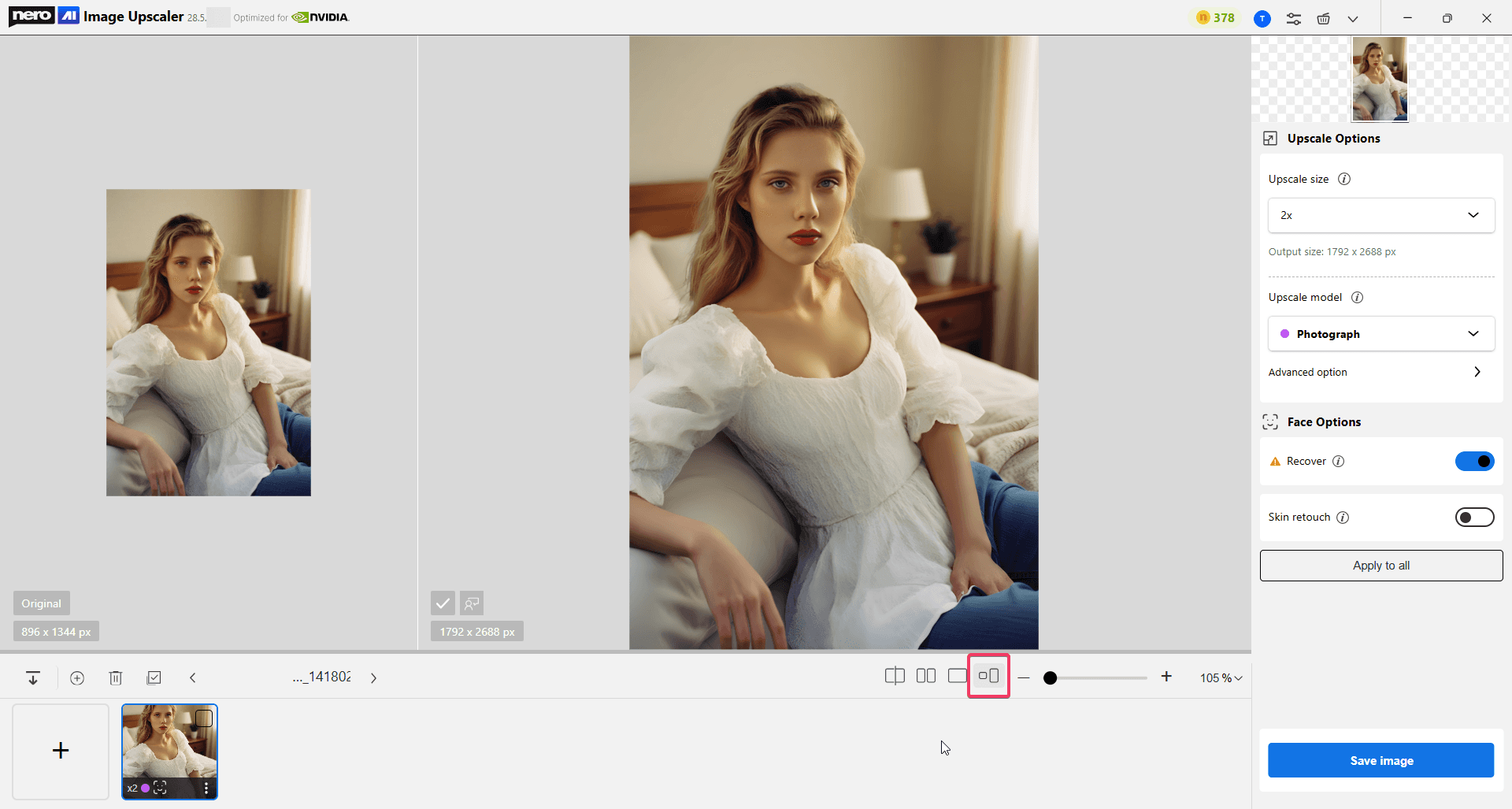
Actual Size Side-by-Side View
A new side-by-side view mode lets you compare images at their actual size, making it easier to visually understand width and height differences before and after processing.
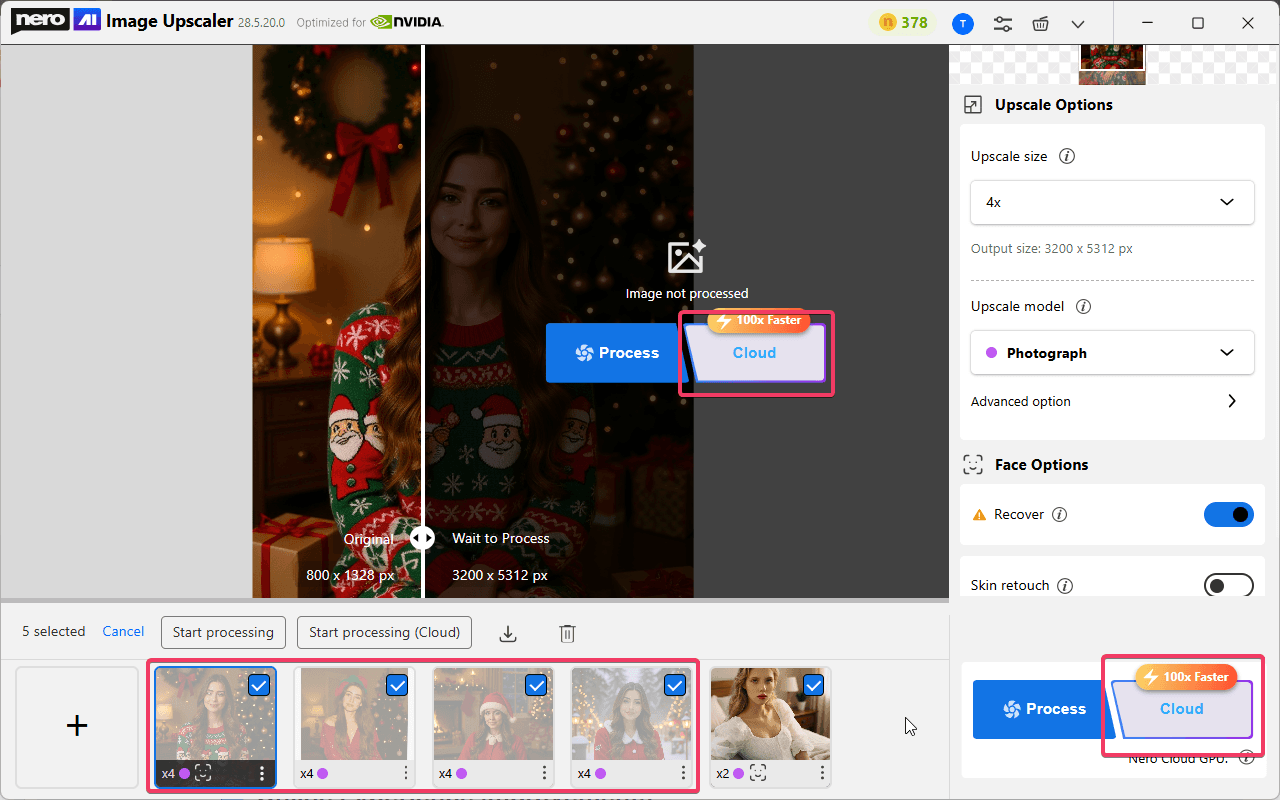
Apply Process / Cloud Actions to All Unprocessed Images
When multiple images are selected, the Process or Cloud button now applies to all unprocessed images at once, significantly improving batch efficiency.
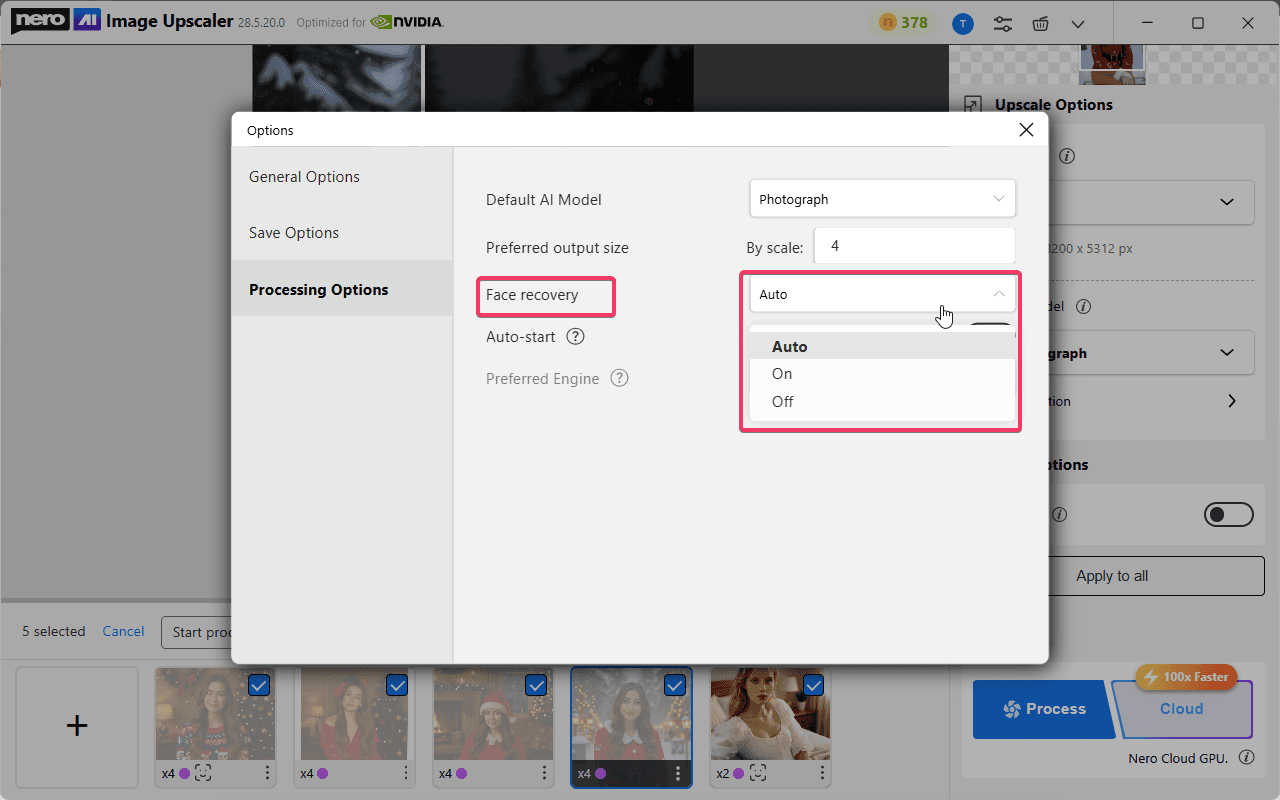
Face Recovery Control Added to Engine Options
You can now set Face Recovery to Auto / On / Off in the engine settings, giving you greater flexibility between automated workflows and manual control.
In Auto mode, the app automatically detects whether an image contains a human portrait and enables Face Recovery only when a face is detected.
Temporary Folder Visibility in General Options
The temporary working directory is now visible in General Options, helping advanced users with troubleshooting and file management.
“Submit a Request” Entry Added to the Menu
A new menu entry allows users to submit feature requests, vote on features they care about, and explore our product roadmap to see what’s coming next.
🌐 Online Experience Improvements
More Accurate Error Messages for Online Failures
Online processing errors now display specific, meaningful messages instead of the generic “file not supported,” making issues easier to understand and resolve.
Fixed Incorrect Status During Online Auto-Start Processing
Resolved an issue where images were shown as finished before processing actually completed when using online auto-start with multiple photos.
[Oct. 2025] Smarter Controls, New Formats, Better Workflow
UI refresh with Dark/Light modes
The interface has been redesigned with clear panels, bigger controls, and new iconography.

Dark and Light themes are available; by default, the app uses Dark Mode, but you can switch manually at any time in Options.


Flexible Upscale size
In addition to 2x / 4x, you can directly pick 1k / 2k / 4k / 8k targets, or choose Custom resolution.

Custom currently supports pixels with locked aspect ratio, so you can resize precisely without distortion.

Models: color labels, and Face can stack
All four upscale models include updated descriptions and color markers for quick recognition in the menu.
Face options can be stacked with any model (e.g., Photograph + Face recovery).

Model strength explanation updated: The slider text now describes how strongly the AI model influences the final result, with tips for keeping faces and textures natural (replacing the old “AI vs Traditional” wording).

New export format: TIF/TIFF
You can now save results as TIF/TIFF, in addition to your existing formats.
Plans, versions & credits
How you get Nero AI Image Upscaler | Version | Credits included | Notes |
|---|---|---|---|
Nero AI Image Upscaler subscription | Pro | 100 credits per year | All features available. |
Nero AI Image Upscaler lifetime | Pro | 100 credits (one-time) | All features available. |
Nero Platinum Suite annual | Pro | 100 credits per year | All features available. |
Nero Platinum Suite lifetime | Basic | 100 credits (one-time) | Face Options and Cloud Processing not available in Basic. |
Credits are used to run cloud processing on the Nero online engine (Cloud GPU).
Cloud vs Local processing
Cloud Process runs on Nero Cloud GPU. Usually, ~10× faster than an NVIDIA GTX1080 and ~100× faster than a local CPU.
Local Process runs on your machine; acceleration requires an NVIDIA GTX1080 or higher.
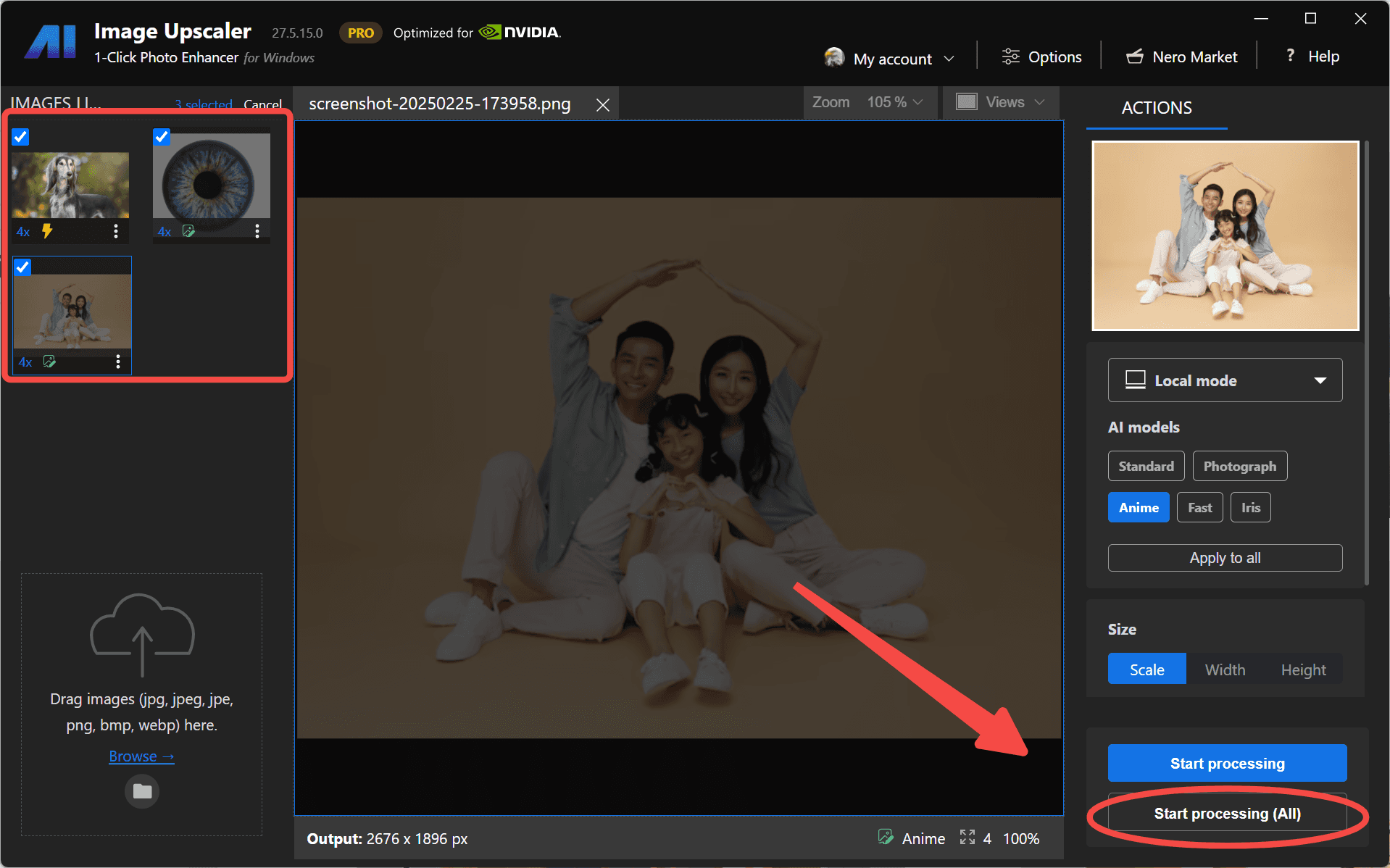
[Mar. 2025] 1-Click Start/Cancel for Images
A convenient 1-click button is now available to start or cancel upscaling for all selected images.
This feature saves time and gives you more control over your batch processing.
[Mar. 2025] New Local Model - Iris
The Iris model has been added to focus on fine contrast details like eyes, fur, hair, feathers, and more. This model is perfect for enhancing delicate details in portraits and close-up shots.

Note: The newly added Iris is a paid model. Only 2025 lifetime and subscription users can access it. 2024 lifetime users need to purchase the 2025 version or a subscription to use it.
[Mar. 2025] Continue Editing in Photosnap
You can now continue to fine-tune your image in PhotoSnap after upscaling it with Nero AI Image Upscaler.
This seamless integration allows you to make further adjustments, apply colors and filters, retouch faces, add clip art and text, and more.

[Jul. 2024] New Model - Face Enhancement
A new AI model – Face Enhancement is included in the online engine mode so you can restore and enhance blurry faces in the desktop app without going to the web service or the mobile app.

[Apr. 2024] Online Mode with Cloud GPU Acceleration
We are pleased to announce that the latest version includes an online engine mode. You can now upscale images faster than ever before, thanks to the acceleration provided by the cloud server GPU.
Online mode includes:
Standard, better for landscapes, city skylines and other screenshots.
Photograph, based on the standard model, optimized for human face.
Anime, good for illustration, painting, anime, and cartoon.
Switch from "Local mode" to "Online mode," where you’ll also see your available credits. For instance, this account has 10 credits.

If you don’t have enough credits, you can purchase more through the Nero AI Credit Center.
You can also buy additional credits as needed. These credits are universal across all Nero AI Web tools. This means you can use them for features like photo restoration, face animation, AI avatars, and more.
